
wePix arena
GIRYEvents
0.00.00 Reviews
- Version
- 3.9.2
- Installs
- 100.00K
- Age Rating
- Everyone
Screenshots
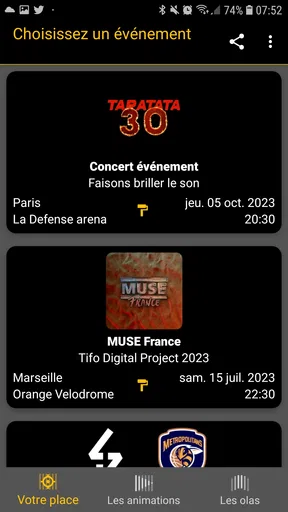
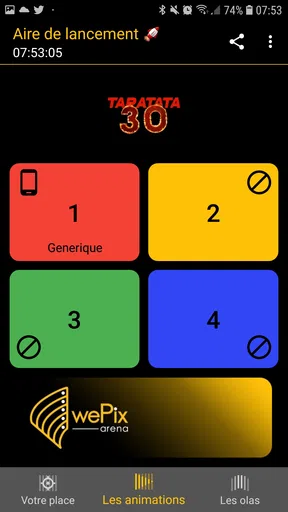
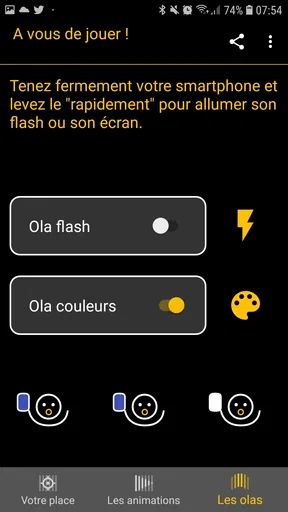
Our Review of wePix arena
 Analysis by Appyee
When I first opened wePix arena, I understood its appeal almost immediately: it is an events app built around turning a group of smartphones into one shared visual experience. Rather than treating each phone as a private screen, it invites people to use their devices together, which can make a gathering feel more coordinated and playful. The idea is simple, but the success of the experience depends on how well everyone follows the same setup and stays engaged.
That makes this a very different kind of app from a calendar, ticketing tool, or ordinary party game. It is closer to a companion for a live moment. You install it before or during an event, join the same activity as the people around you, and let the collection of phones contribute to the atmosphere. I would recommend it most to someone attending a coordinated event, supporting a group presentation, or looking for a lightweight way to make a crowd participate visually.
The app is free and suitable for everyone, so there is no purchase decision blocking a first try. It comes from GIRY, has passed the 100K-install mark, and its current version is 3.9.2. Those details matter less than the central question: do you have a real group occasion where several people can use their phones at the same time? If the answer is yes, the concept makes much more sense than it does as a solo download.
What to expect before you begin
The first thing to adjust is your expectation. This is not an app that becomes especially useful after you spend hours exploring menus. Its value appears when other people are involved. A single phone can help you understand the interface, but the meaningful result comes from several participants acting together and following the same event instructions.
That group dependency is both the strongest feature and the main limitation. In a room where everyone is ready to participate, the phones can become part of the event instead of distracting from it. In a room where only one or two people install the app, the experience may feel incomplete. I would therefore avoid downloading it without knowing how it fits into the occasion. Ask yourself whether the organizer, host, or group has a shared activity in mind.
The app’s store summary describes the goal as making smartphones work like a giant screen. I found that a useful way to think about it, but not as a promise that every phone literally becomes one perfectly continuous display in every situation. The practical result depends on coordination, positioning, timing, and the event itself. Treat it as a shared visual tool rather than a replacement for a physical screen.
It fits naturally into concerts, community gatherings, school activities, celebrations, fan events, and other moments where a crowd wants to show a common image or pattern. It can also be interesting at a small indoor gathering if everyone is willing to follow the same instructions. For private solo use, however, a normal wallpaper app, media player, or event information app would usually be more useful.
One important trade-off is attention. Phones are normally designed to pull people into separate feeds and messages. This app asks them to do the opposite: hold onto a shared purpose. That means the best results come when someone clearly explains when to open it, what to do, and when the activity is finished. Without that human direction, participants may wonder whether they have joined correctly or whether anything is happening.
Who will get the most from it
I see three especially good audiences. The first is an event organizer who wants a simple participation layer without asking guests to buy special equipment. The second is a group attending an occasion where synchronized phone screens are already part of the plan. The third is a curious user who enjoys trying unusual event utilities with friends and is comfortable learning by doing.
It is less suitable for anyone seeking a complete event-management platform. It does not replace invitations, schedules, ticket storage, venue directions, registration, or a conventional communication channel. If your priority is keeping track of an event rather than contributing to its visual presentation, another category of app will serve you better.
I would also be cautious about using it with a group that has unreliable connectivity, limited battery, or little patience for setup. I cannot treat the app as a magic solution that removes those practical concerns. A shared phone display still depends on people having working devices and being willing to participate. The more important the visual result, the more useful it is to prepare the group beforehand.
Getting through the first setup
Installation is the easy part. The app is available at no cost and supports Android devices running version 5.0 or later, which covers a broad range of phones. After installing, I would begin by checking that the app opens normally and that the phone has enough battery for the event. That sounds obvious, but a synchronized activity is frustrating when someone has to leave halfway through to find a charger.
For a first attempt, do not start with a large crowd. Try it with two or three people in the same room. This small rehearsal lets you see how the shared activity is joined and whether everyone understands the same screen. It also separates genuine setup confusion from problems caused by a noisy venue or a rushed schedule.
Keep the phones close together during this test and ask every participant to follow the same sequence rather than tapping around independently. One person should act as the guide. That guide can open the activity first, explain what the others should look for, and wait until the group is ready before moving forward. This simple division of roles is one of the most useful practical improvements I found.
Another helpful habit is to use a recognizable group name or event reference whenever the app presents a choice involving participation. People often make mistakes when several activities are happening at once, especially in a busy venue. A clear label reduces the chance that someone joins the wrong session or assumes that a blank-looking state means the app has failed.
Do not judge the app from a quick glance at one phone. Its purpose is collective, so the first setup should be evaluated across the group. Look for whether each person can identify the same activity, whether the screens respond in a similar way, and whether participants know what action is expected next. If one phone behaves differently, pause and resolve that before trying to create the final display.
The minimum operating-system requirement is Android 5.0, but compatibility on paper is not the same as a smooth event experience on every older device. Older phones may have slower responses or less comfortable screens, and people may hold them differently. I would avoid making the oldest or least reliable phone the one responsible for explaining the activity. Give that role to the person with the clearest, most dependable device.
Making the first meaningful result happen
The first successful action should be modest: get a small group to show the same coordinated visual result at the same time. Do not begin by trying to organize a full venue. A short, controlled test gives everyone confidence and makes it easier to identify where the process breaks down.
Here is the workflow I would use. First, choose one person to guide the group. Next, have everyone open the app together and identify the same event activity. Then, ask participants to hold their phones in a consistent orientation and at roughly the same height. Finally, give a clear countdown before the group performs the requested action. The countdown matters because people naturally tap at different times when no one is leading.
Once the group sees the intended effect, stop and repeat it once. The second attempt is valuable because it shows whether the success was repeatable or merely accidental. It also gives late participants a chance to join without disrupting the first demonstration. If the result looks uneven, check timing and phone positioning before assuming the app itself is at fault.
A realistic everyday scenario would be a small community event where the organizer wants the audience to participate during a key moment. Instead of handing out props, the organizer asks attendees to install the app in advance, identifies the activity before the program begins, and uses a short countdown when the moment arrives. The phones then become part of the audience’s response. The important preparation is not technical complexity; it is making the instructions visible and giving people enough time to get ready.
For a family celebration, I would use the same approach but keep the goal smaller. Ask relatives at one table to participate rather than expecting every guest to understand the process immediately. This creates a visible demonstration that can encourage others to join. It also prevents the event from being interrupted by repeated explanations.
One non-obvious tip is to designate a “reset person.” If someone loses track of the activity, that person can help them return to the correct starting point while the rest of the group continues. Without this role, everyone may stop at once, and a minor mistake becomes a group-wide interruption. A second tip is to rehearse the hand position as well as the taps. A coordinated image can look less convincing when phones are tilted randomly or held at very different distances.
Where first-time users may hesitate
The most likely confusion is assuming that opening the app automatically creates a shared result. It does not make sense to think of it like a photo editor or a normal single-player utility. The experience needs a common activity and multiple participants. If your screen looks inactive while you are alone, that may simply reflect the app’s event-focused design rather than a defect.
Another point of friction is knowing who should lead. In a spontaneous group, everyone may tap at once, skip different steps, or start explaining over one another. The solution is straightforward: choose one guide and let everyone else follow. This is particularly important for first-time users because people often interpret unfamiliar screens differently.
Participants may also wonder whether their phone is supposed to be held vertically or horizontally, or whether they should move it during the activity. Those details should be settled before the group begins. If the event organizer gives no guidance, start with a consistent orientation and keep the device steady. Consistency is more useful than trying several positions during the live moment.
Battery and distraction are practical concerns too. A phone used for a shared display is not available for normal use at the same time. Someone expecting an important call, navigation assistance, or frequent messages may not be the right person to involve. I would tell participants to finish urgent tasks first and then join, rather than asking them to divide attention during the activity.
Privacy-conscious users may also want to understand the role they are taking. The app is being used as an event tool, not as a general social feed in my experience. Still, anyone uncomfortable with installing an event-specific app should be allowed to skip it without pressure. A successful crowd activity should feel optional and enjoyable, not like a requirement for entry.
There is also a difference between a planned event and an informal gathering. At a planned event, an organizer can prepare instructions, test the process, and coordinate timing. At an informal gathering, the novelty may be enjoyable, but the result will probably be less polished. I prefer the app in the first situation because its shared-screen idea benefits from structure.
How it compares with familiar alternatives
The usual alternatives depend on what you are trying to accomplish. If you want people to see one large image, a projector or venue display is more reliable and easier for the audience because nobody has to install anything. If you want audience participation, physical signs, glow items, or coordinated gestures may be more immediate. If you need event information, a calendar or messaging app is clearly the better choice.
wePix arena has a different advantage: it can use devices people already carry, avoiding the need for a separate visual prop for every participant. That makes it appealing when an organizer wants a shared effect with little physical equipment. The trade-off is that participation becomes dependent on installation, readiness, battery, and correct timing.
Compared with a standard party game, it appears less focused on individual competition and more focused on making the group look coordinated. That is why I would not recommend it to someone looking for levels, scoring, or a long solo progression. Its reward is the event moment itself. Once the activity is over, there may be little reason to keep opening it unless another gathering gives you a purpose.
Compared with a video call, it is also more limited but potentially more atmospheric. A video call connects people who are apart; this app is most interesting when people are physically together and want their phones to contribute to the same scene. Those are different needs, and choosing between them depends on whether the group is separated or sharing a venue.
Taking the next step with a group
After the first successful test, the best next step is not to add complexity. Repeat the same activity with a slightly larger group and improve the instructions. Tell people when to install the app, where to find the shared activity, how to hold their phones, and when to begin. A short message sent before the event can prevent more confusion than a long explanation during it.
For organizers, I would prepare a backup plan. The app can enhance a moment, but the event should not collapse if some guests cannot participate. Keep the main announcement, performance, or celebration usable without the phone display. This is a fair compromise: participants who enjoy the shared effect can join, while everyone else can still follow what is happening.
It is also worth deciding when to stop. Repeating a synchronized phone effect too often can make it feel routine and distract from the main event. I would use it for one or two meaningful moments rather than keeping everyone’s attention on their screens throughout the gathering. The app works best as a deliberate accent, not as the entire program.
GIRY’s event-focused app has a clear identity, and I appreciate that it does not pretend to be a complete replacement for every event tool. Its strongest quality is the way it gives ordinary smartphones a collective role. Its main weakness is equally clear: without a prepared group, the experience has limited value and can feel confusing.
My recommendation is simple. Install it if you already have a specific gathering, a willing group, and a reason to create a shared visual moment. Test it with a few people first, appoint a guide, use a countdown, and keep a non-phone alternative ready. Skip it if you want a solo entertainment app, an event planner, or a dependable large-screen replacement. For the right occasion, though, this free app can turn a collection of separate devices into a small but memorable part of the event.
Verdict
Strengths of wePix arena
- Fast-paced matches are easy to start and keep sessions engaging.
- The arena format makes competition feel direct and exciting.
- Simple controls help new players learn the core gameplay quickly.
- Short rounds suit quick gaming sessions on mobile devices.
- Regular competition can encourage players to improve their skills.
Limitations of wePix arena
- Matchmaking quality may vary depending on the number of active players.
- The competitive focus can feel repetitive after extended play sessions.
- Progress may be less rewarding for players who prefer story content.
- Online play can be affected by connection issues or server delays.
- Some features may take time to unlock without frequent gameplay.
Similar Picks in This Category
View All
Easy Quran Mp3 Audio Offline
Muslim Worldapp4.7

Invitation Maker: Cards & RSVP
Greetings Island4.9

StubHub - Live Event Tickets
StubHub4.3

Fever: Events & Tickets
Fever Labs4.7

Epic Freebie Games Radar
Arioch Pds - Apps & Games4.4

Invitation card Maker, Design
Splendid App Maker4.9
Frequently Asked Questions
What is wePix arena and how does it work?
wePix arena is a mobile gaming platform focused on competitive play and interactive challenges. After installing it, users can explore available game modes, enter arenas, complete objectives, and compare their performance with other players. The experience is designed around quick sessions, rankings, and progression, although the exact content and available features may vary depending on the version installed and the user’s region.
Is wePix arena free to download and play?
wePix arena can generally be downloaded without an upfront purchase, but users should check the store listing for the current pricing details before installing it. Some features, digital items, premium content, or competitive options may involve optional in-app purchases. It is also worth reviewing payment settings and parental controls, especially if the application will be used by children or on a shared family device.
Does wePix arena require an internet connection?
An internet connection is normally important for wePix arena because competitive arenas, account synchronization, rankings, updates, and other online services may depend on communication with the game servers. Some parts of the application might open without a connection, but the main experience may be limited offline. For smoother matches, a stable Wi-Fi or mobile data connection is recommended.
Is wePix arena suitable for children and safe to use?
Parents should review the official age rating, privacy policy, permissions, and communication features before allowing children to use wePix arena. If the app includes online competition, profiles, chat, advertising, or purchases, supervision may be appropriate. We also recommend using device-level parental controls, disabling unauthorized payments, and checking what personal information is requested during registration or gameplay.
What devices are compatible with wePix arena, and what should I check before downloading?
Compatibility depends on the operating system, device model, available storage, and the minimum software version listed on Google Play or the App Store. Before downloading wePix arena, check that your phone or tablet meets those requirements and has enough free space for installation and future updates. Older devices may run the app less smoothly, particularly during online matches or graphically demanding arena activities.
